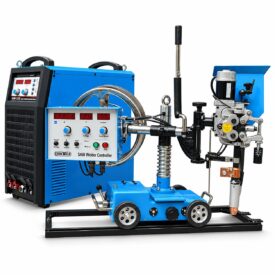
Troubleshooting guide › Fix it yourself, by machine › CSW submerged arc machines
The CSW machines show a fault code on the display when something is wrong, which removes most of the guessing. This page lists the codes, the protections that look like faults (wire-touch protection, the 20-second auto-stop), the tractor faults, and the checks that clear them. For bead problems, see the submerged arc process page.
Reviewed by the Cruxweld technical team, October 2026. Settings are starting points to confirm on a test piece; acceptance is decided by the code or drawing the job is built to. Checks marked “call” are for our technical team.
| Code or behaviour | Meaning | What to do |
|---|---|---|
| E19 | Thermal protection: ambient over 40 degrees C, fan failure, or the temperature relay | Let the machine run off-load until it clears; check the fan is turning and the louvres are clear; if it returns at low load: call |
| E43 | Communication failure between machine and control box: loose or broken control cable, or the overload protector on the panel tripped (feeder or carriage motor overcurrent) | Reseat both ends of the 14-core control cable; find why the motor overloaded (wire jam, wheel blocked); reset the overload protector |
| E18 | Head feedback line disconnected: voltage feedback wire broken, or the positive output cable not connected | Check the feedback lead from the head and the positive cable at the machine |
| E70 | Short circuit when switching from SAW to MMA mode: the torch or the head is touching the work | Lift the head clear of the work, then switch |
| Wire will not feed down while it touches the work | Wire-touch protection | Lift the wire clear, or hold the feed / retract switch for more than 3 s to override |
| Welding stops about 20 s after Start with no arc, or 20 s after the arc is lost | Automatic shutdown | Check the tip, the earth and the wire contact; restart |
| Fan runs only while welding and stops a while after | Normal | Nothing |
| What you see | Check yourself | If it persists |
|---|---|---|
| No display after power-on | Supply phases; the internal 3 A fuse (user-accessible on the rear on most units) | Breaker, board or transformer: call |
| Breaker trips immediately at switch-on | Nothing outside | Call; do not keep resetting |
| Machine does not work, display on | Supply phases, fuse, control cable, fan running | Relay or board: call |
| Parameters cannot be adjusted | Encoder knob loose; display board on the machine or the trolley box | Call |
| Welding current unstable | Phase loss; supply sagging at peak hours | Rectifier, current sensor or board: call |
| Welding voltage unstable | Contact tip burnt; feed roller worn or not pressed; earth contact poor; earth cable too long | Replace the tip; set the roller; shorten and clean the earth; then call |
| What you see | Check yourself | If it persists |
|---|---|---|
| Tractor will not start | Start button; 14-core control cable at both ends; power source running | Control box board: call |
| Travel unsteady | Travelling wheel loose; clutch slipping; track or plate dirty; hoses dragging | Clutch: call |
| Difficult arc starting | Contact tip burnt; wrong wire diameter selected on the panel; stick-out (bring the wire to 3-5 mm from the plate); wire end cut sharp | Call |
| Slow wire feed only after start | Negative cable contact | Source: call |
| No wire feed or no travel | Mechanical jam; toggle switch; motor brushes | Motor or board: call |
| Current out of control | Control cable damage | Machine fault: call |
| Flux does not flow | Hopper empty; nozzle or hose blocked with slag lumps; damp flux caking | Clean the hopper and hose; dry the flux |
The overload protector trips when the feeder or carriage motor draws too much: a wire jam, a worn liner, a wheel fouled by slag, or a dragging hose. Fix the drag, not the protector.
Flat (CV) for wire up to 3 mm, drooping (CC) for 3 mm and above. The wire diameter selector must match the wire fitted, or arc starting is poor and the bead wanders.
Open your model for its specifications; the spares page lists the consumables for it.
If the machine runs but the weld or cut is wrong, the cause is usually settings, consumables or the material. Start here:
The SAW power source runs at 100 % duty for hours; its enemy is heat and a sagging supply. Keep the louvres clear, the ambient reasonable and the supply cable sized for the full current, and E19 stays off.
Send a photo of the weld or cut, your machine model, consumable and plate thickness. Our technical team replies on WhatsApp with the likely causes and the next checks to make.
45+ years of welding expertise · GeM Registered OEM Manufacturer · Supported Worldwide